Operation and Service Manual
Safety Instructions About Operation and Service Manual
Read the instruction carefully before installation of receiver R19 or radio remote which includes installation, maintenance, and operation of the system, Operating manual must be kept at close vicinity of the operator while they are operating the system. Radio remote Receiver is used for various different system ensure the safety and accident prevention regulation is observed during installation or maintenance or operation. Radio remote receiver or system must not be used where there is excessive electromagnetic interference and where mechanical interference leads to physical damage. Receiver must not be used in explosive environments, areas with extreme temperatures outside the specified range, or locations with excessive electromagnetic interference. Avoid using the receiver in environments with corrosive substances or heavy industrial pollutants.
Any modification in the radio system must and only be carried out by expert staff who received training and personnel who was granted authorization from RAS Wireless and changes carried out in the radio system must be recorded at the customer facility. Ensure the staff has a readily training/familiarity with emergency stop procedure Electrical connection on the receiver must be ensured by the trained electrical staff exclusively as per the wiring diagram If the internal of the receiver is to be checked it must be opened by trained and qualified staff some component inside the receiver operate on high voltage and may be dangerous. Receiver must be free from any power supply .i.e. deactivated before checking internal parts of the receiver During the process of installation person presence beneath the load of the crane is strictly prohibited. Ensure the Receiver is visible after installation on crane, Visibility must be there during movement of crane, movement of load and ensure it is installed in a safe place. It is strictly prohibited to leave radio system unattended when the system is in activation Always turn off the system when not in use This is also applicable when the operator is on break or changing its location of work. If the system is showing error ensure the system is turned off and if the system is showing error midway of operation apply the emergency stop procedure to halt the operation. Always check the system before starting the operation any discrepancy in the system may result in discrepancy/harm/delay in the operation rectify the system before starting to operate with radio system. Only operate when the system is in perfect order. Repair of the radio system must be carried out by trained staffs and in case of replacement of any parts use original replacement parts or accessories using other than RAS Wireless parts or accessories is not guaranteed by RAS Wireless and it will also hinder the operation. Always remain careful while operating the system with radio remote system whether it is been used for the first time or many times.
Installation of Receiver
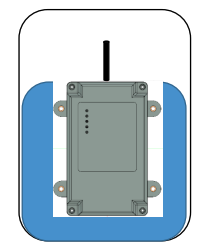
Correct Orientation
Metals must not be in vicinity of 1m around the antenna of the receiver and must be placed vertically with antenna on top
Incorrect Orientation
Install the Receiver with provided mounting isolators
Electrical Connections
- Radio Receiver is connected via a cable gland connection to the machine electric.
- Receiver will only be connected to the supply voltage indicated on the type plate
- Connection of the receiver from the machine electric must be carried out by skilled staff
- Connection must be carried out by given wiring diagram
- Switch off the supply voltage before making connections or opening the receiver for checking
Control Display
There are LED present over receiving unit for understanding of the operational scenario
- [YELLOW] – LED indicates Power of a receiver
- [RED] – LED indicates that there is no communication between transmitter and receiver
- [GREEN1] – LED Indicates that the communication is enabled between transmitter and receiving unit
- [GREEN2] – LED indicates the safety channel movement error
- [GREEN3] – LED indicates the feedback from the system.
Technical Data
| Sr.No |
Elements
|
Volume
|
|---|---|---|
1 |
Supply Voltage |
85 – 240 V AC, 50 Hz |
2 |
Power Consumption |
Output Power Consumption - 30W |
3 |
Number of Relays |
21 including 2 E-Stop |
4 |
Indicator |
|
5 |
Weight |
NA |
6 |
Antenna |
External |
7 |
Dimensions |
148 x 100 x 249 mm (5.8 x 3.9 x 9.8 in) |
8 |
Frequency range |
2.4 GHz, 868 MHz |
9 |
Mounting |
Mounting with Rubber Isolators |
10 |
Enclosure |
ABS Plastic |
11 |
Input |
2 x Analog (4-20 mA), 4 digital Inputs (12/24V DC) E-stop (Fail Safe) |
12 |
Safety Function |
E-stop (Fail Safe) |
13 |
Connection |
Cable gland M32 x 2 (mating connector optional) |
14 |
Operating temperature Range |
-20 to 70 C |
15 |
Protection class |
Ip65 |
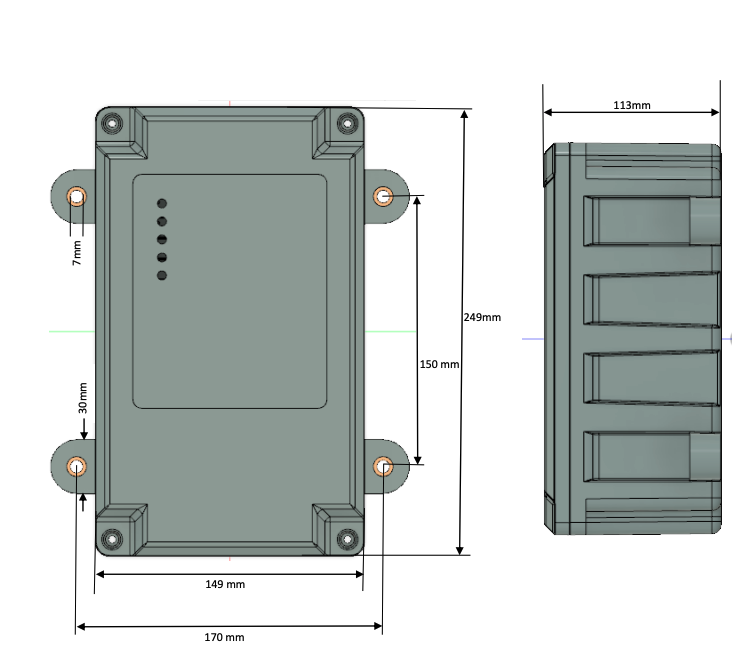
Dimensions
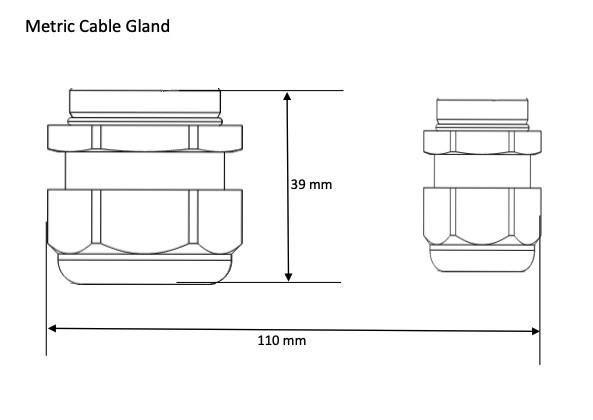
Connection Options
Troubleshooting
| Sr.No |
PROBLEM
|
PROBABLE ISSUES
|
RECOMMENDATIONS
|
|---|---|---|---|
1 |
Unit not turning ON |
|
|
2 |
No Signal/Poor Signal |
|
|
3 |
Receiver not responding to Commands |
|
|
Maintenance
- Outline specific components that should be inspected regularly, such as connectors, cables, antenna (if applicable), and overall physical condition and regular inspection of radio system is recommended
- Usage of high pressure cleaner or sharp or pointed objects to clean the receiver or transmitting unit is strictly not recommended
- For accurate operation of the radio system test the system with the instructions given
- Consider environmental condition for smooth operation of the radio system putting the system in adverse environment which is not recommended may hamper the functionality of the system.
Service
- In case of fault whether it is full or partial do not operate your machine.
- Send complete radio system to the assigned distributor or directly to manufacturer in case of repair or return
- Do not try to repair on your own without having prior training or consultation with RAS Wireless
- Send the system pack securely to avoid further damage to the system and to the following address